
Friday, December 17, 2010
14th week
There was only one day that we had in class which was where we had to do the Jeroo final, something we've never seen before. It was kind of a tough experience, because we had to use JAVA to accomplish a goal we've never seen before. We simply just didn't have the time to complete it, or else my group could have gotten a better grade. Even though it was a class effort, that point was emphasized enough, and it was more of the smart people doing it, while the people who didn't know how to do it, would copy. I feel our group did a well job since all of us contributed and got pretty far into the program.

Saturday, December 11, 2010
13th week
This week was the last week before finals week. Our production of our original project has somwhat stopped, and we feel accomplished about it. Now we will begin to think of new ideas for the next semester. Also, comp sci final is on Thursday of next week, and the prompt will be only showed to us on Thursday.
Sunday, December 5, 2010
12th week
Our program was barely touched this week. The reason being, we either looked at the UIL test packet and discussed the problems we got wrong, or have been working on robocode. In two weeks, will also be finals week and since this class will be on thursday we have the most time before it arrives. I'm still not sure whether the finals will just be a compilement of the previous 3 six weeks, or maybe see how functional our program we have been making is, or whatever it's going to be no one's exactly sure.
Thursday, November 25, 2010
11th week
Since this week was dominated by Thanksgiving Break, and we just worked on Robo-code, there wasn't any advancement in our project. However, the weekend before, Matt, Allan, and I participated in the UIL competition and placed 2nd place in the programming section and 4th overall out of around 12 teams. Also, my robot that I might still work on, is designed more for kamakazi, rushing the opponents and giving them tackling damage.
Friday, November 19, 2010
10th week
This week we prepared for the LASA showcase and make our code ready enough to be shown to the possible LASA. We attempted to incorporate the new button from my code into Matt's code, however it didn't end up nicely; there were many errors and it didn't do the function the new button is supposed to do. Also, tommorow I have the written/group test so I'll try to do some practice.
Saturday, November 13, 2010
9th week
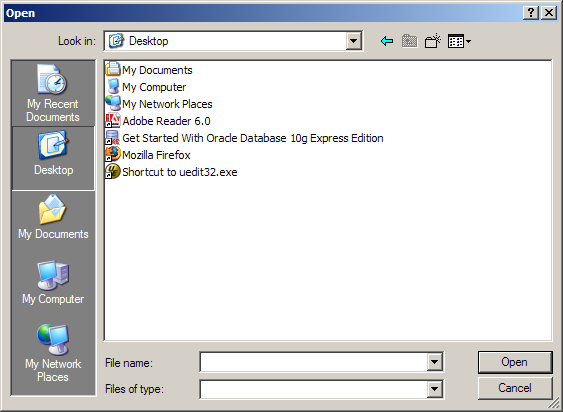
Throughout the week, our group many breakthroughs which has made our project a lot more accomplished. First of all, I was finally able to get the open and save incorporated into our application. So whenever Control+o is pressed, the open dialouge comes up and same thing with Control+s, which makes it save. You can search through all of the files in the computer, however we are not actually able to save or open the text in our program. Another breakthrough made, was the scrollpane automatically scrolling. So whenever "enter" is pressed, the fullscreen application automatically scrolls down for you. This allows for the text to always remain near the center of the screen. The problem is that, lets say you wanted to put an enter between the first two lines; instead of giving a line of space, it scrolls down, so one thing we need to do next week, is tell the program to only scroll down when enter is pressed at the bottom of the screen.


.png)
Sunday, November 7, 2010
8th week
Having eaten pizza and watching a video on Thursday, the only time we had to work was on Tuesday. I don't remember changing anything significant, but we had just edited the code just a bit, fixing errors, deleting redundant codes. In two weeks, the UIL starts, so I've got to do a bit of preparition as well as bring $10. Just as a side note, my birthday was over the weekend, so atleast I get good, little reward after this extremely hard week of tests/projects/debates, and half of my grades havn't even been put in yet. So on Monday or Tuesday, its pretty much going to be a surprise of the grades I made this second six weeks.
Saturday, October 30, 2010
7th week
Finally, we were able to go back and forth between the fullscreen and smallscreen windows. However, this is still a small problem that whenever switching from fullscreen to the smaller screen, two windows pop up. Wierdly enough, both windows are the smaller screen, one is a "mirage" and you can't even type in it and it doesn't have the theme, and the other does have the theme (which we don't want on the smaller screen) but you can edit it in. Next week, we'll hope to find an answer to this problem. Also, now that I have learned about the UIL Contest, I'm starting to become interested in it. I've looked on the website, and there's a individual test and then there's a team programming contest. And the good thing is that teams are allowed to use up to 2 reference books chosen prior.

Sunday, October 24, 2010
6th Week
Having only 2 days this week, we weren't able to manage as much stuff as we had done in the previous weeks. This week, we were all assigned our specific tasks, like Matt working on the save/open buttons and functionality, I'm working on connecting both the projects together, and Micah working on the fonts. In the 2nd or 3rd week, I had found an online JAVA code that ran a program that opened an open and save window which let you choose through the files, but we're having a hard time trying to incorporate that code into our project. For the fonts, we are still working on it. One thing I was able to accomplish this week was getting both the fullscreen project and the main project interconnected. This is a big step to our project because now when running the Main Project, you get to type whatever, and whenever you click the menu item "Go Fullscreen" the application actually turns fullscreen! This makes us feel quite accomplished and professional, but now the problem is getting the text from the small window to be the same in the fullscreen window. We've tried to deal with this problem for over 30 minutes but there's been no luck.
Saturday, October 16, 2010
5th Week
The greatest achievement of this week was the implementation of a theme into our project. It seems quite confusing, but actually all that needs to be done is download the theme file, and have the java class "implent it". With this, our text editor is very professional looking, with this classy-black new theme. Before, it was the window's classic, with the bright colors and not-so good looking menubar and scroll bar. But with this theme, everything looks better. If one would look at our project now it would seem that we worked on it for a very long time now. Also we are still working on the button functionality.
Our theme:

Our theme:

Friday, October 8, 2010
4th week
Even with Micah out the entire week, Matt and I were able to accomplish a lot in the class. Rather than making robocode, we decided to work on our projects instead and we got a lot of things done. First, we were able to retrieve the lost code (make a new code) for making the screen fullscreen. Then we made the background black, and the font green. We were also able to figure out how to adjust the font and font size of the text that goes into the text area. Then, we were able to come up with the margins so the text doesn't go all the way to the edges of the screen. We made a scroll pane, that includes the scroll bar, which allows the user to go up and down freely through the text editor. The more button functionality we worked on was the cut/cope/paste button which all work appropriately when pressed (control + x/c/v). The two major problems we had was having it to do those 3 conditions when a button is clicked, but we came to a consensus that when in fullscreen mode, the user will be using keyboard shortcuts, not the buttons in the file menubar. Thus, it makes no real difference. Another problem was the border of the fullscreen page was white, but we were able to make it black also. The still occuring issue is making the scroll bar not appear because its very distracting and doesn't match write-room.
Sunday, October 3, 2010
3rd week
This week we were able to figure out how functionality is given to buttons, menubars, etc. All this is made possible with the help of ActionListeners. This is a method in Java, that allows us to tell what the program should do if the button or any other task is clicked or chosen. I was able to figure out a button which was able to clear all the text on the screen, and Matt was able to add functionality to the "Close" button on the file menubar. ActionListeners are actually a bit tricky but I think that if we read few more tutorials we can give a few more buttons functionality.
Tuesday, September 28, 2010
2nd week
Last week we managed to make a completer window with a menubar at the top. The dropdown menu is shown, however we haven't gotten the buttons to function when clicked. We also added a text portion to the window, where the user can type and it will move to the next line after it reaches the end of the line. We also found the code to change the text, font, size, and style. attributedString.addAttribute(TextAttribute.FONT, font1, 10, 10). Also we got a window that goes fullscreen, however that is somewhere lost in the cyber world, so we will have to re-do that. This week's goal is to provide some functionality with the buttons on the menu-bar, most important ones are the open and save.
Saturday, September 18, 2010
Ideas for JAVA Project
The plan for our java project is to be a word processor. We will have a text editor, where the user will be able to type their info in a non distracting environment. There will be many features, and we will try to make unique features that have not existed on Microsoft Word (our so-called "competition"). It is based on a Mac application called "WriteRoom" where the page takes the entire screen, and all the user sees is their text. LASA students will especially find this application useful, and since there is only a Mac version available, it will be something new for most people.
The screen of WriteRoom


Thursday, September 16, 2010
Welcome!

Welcome to my blog of Computer Science 2. Over the next couple of months I will be creating a JAVA application on the computer.
Subscribe to:
Posts (Atom)